
O4 Air Unit Pro — install (UL8 + ArduPilot + ELRS)
Digital FPV on the UL8 — install from the DJI manual, adapted to our Pixhawk/ELRS stack
The O4 Air Unit Pro was on the bench and the manual said: connect S.Bus, enable Canvas Mode, done. Fine — if you fly Betaflight + DJI radio. We don’t. Pixhawk 6X Mini + ExpressLRS on the AOS UL8 V5. Same hardware, different order, and a few wires we leave open on purpose.
Source: DJI O4 Air Unit Series User Manual (also local in part 23/media).
The problem we’re solving
We want picture in the goggles without breaking the radio stack. O4 = eyes. ELRS = stick link. ArduPilot = brains. Mixing those (S.Bus and ELRS, or OSD on a busy UART) is how beginners lose weekends.
What we expect:
- Video to DJI goggles — standalone (power + antennas + link)
- RC via ELRS XR4 on TELEM2 — not via O4
- Yellow S.Bus wire — open
- OSD (MSP DisplayPort) — optional later, once a UART is free
- Power — direct 6S from the Y-splitter (Pro: 7.4–26.4 V)
1. Power & 3-in-1 cable
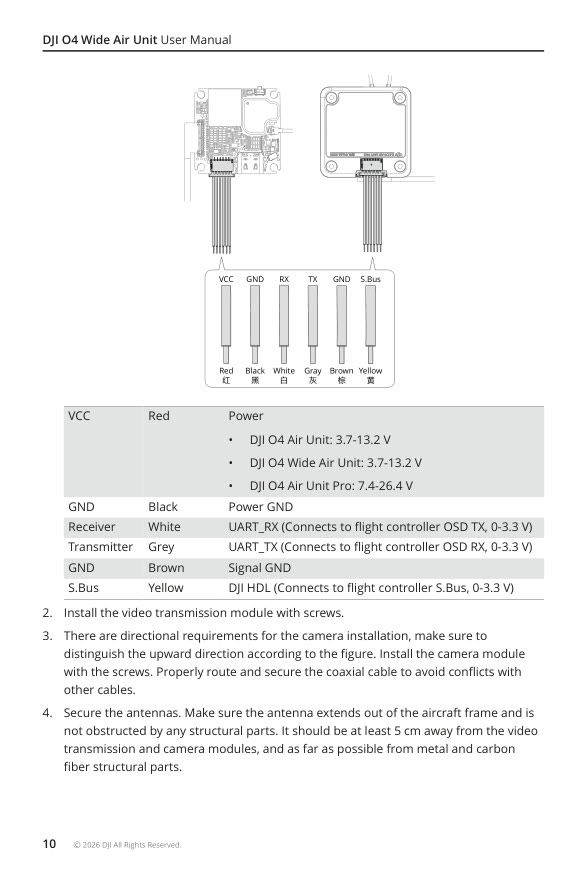
From the DJI manual wiring page. Pro range: 7.4–26.4 V.
How it fits together: red/black feed the air unit. White/grey/brown are for optional UART to the FC (OSD). Yellow is DJI’s RC path — we ignore it.
| Color | Function | Our choice |
|---|---|---|
| Red VCC | Pack / BEC | XT60 branch of the Y (6S OK on Pro) |
| Black GND | Power GND | Same rail GND |
| White UART_RX | FC OSD TX | Later → free UART (not TELEM1/2) |
| Grey UART_TX | FC OSD RX | Later → crossed with white |
| Brown GND | Signal GND | With UART |
| Yellow S.Bus | DJI HDL | Open — ELRS owns RC |
If using a BEC instead of pack: Pro wants ≥ 13.5 W (e.g. 9 V / 1.5 A). We prefer pack rail via Y — one plug, fewer mysteries.
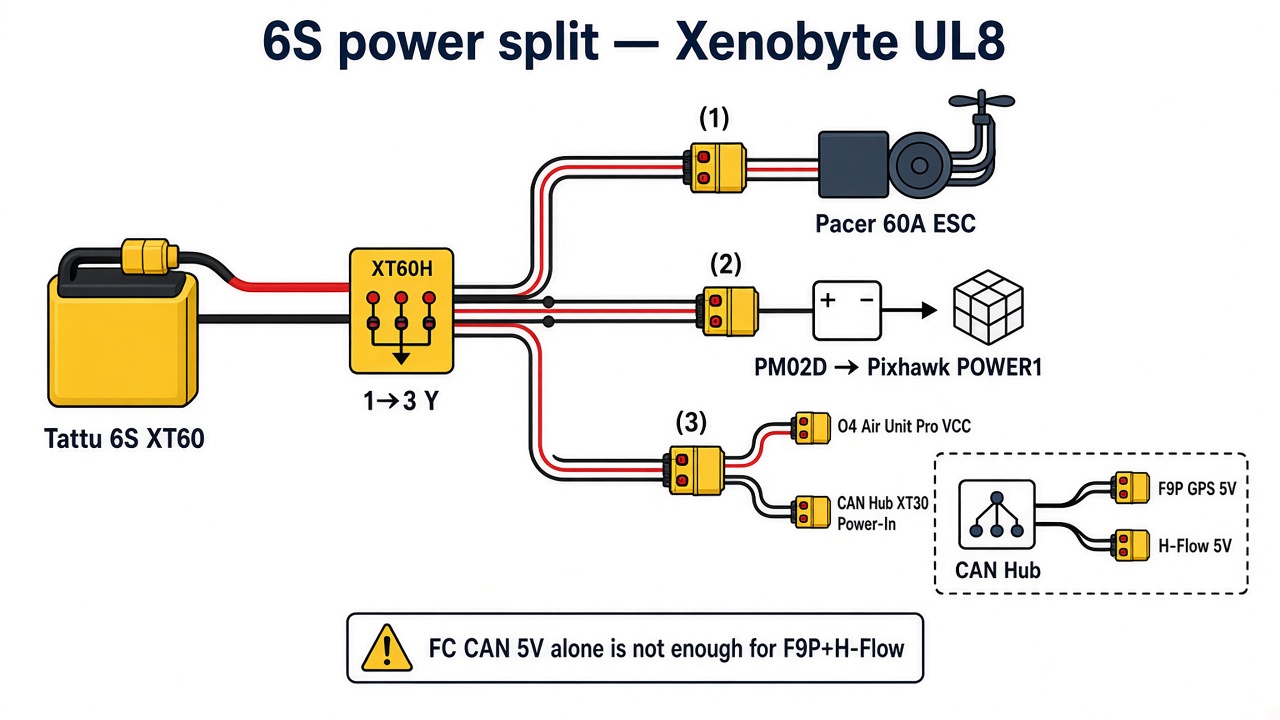
Full power architecture (incl. CAN Hub): power & capacitors.
2. Mounting (camera + air unit + antennas)
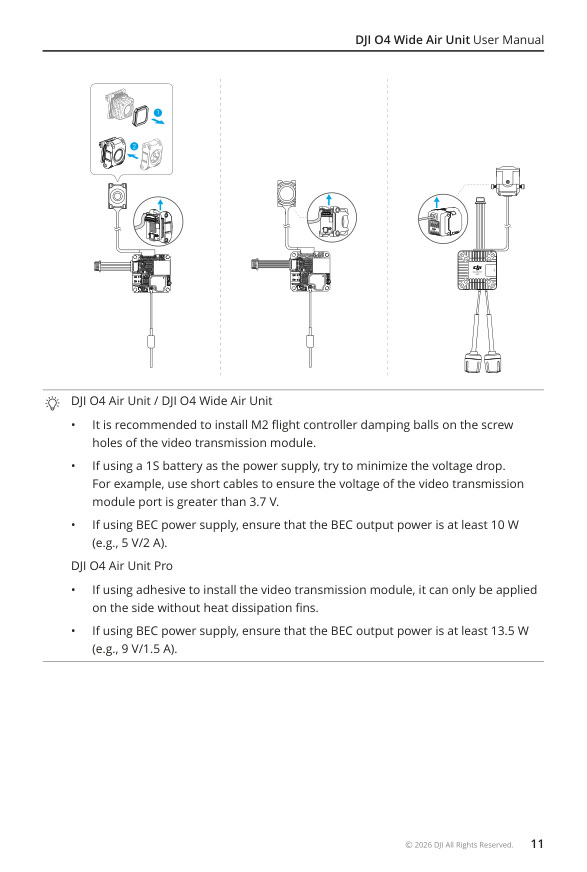
Pro: keep the heatsink clear; adhesive only on the flat side without fins.
Why this matters: a hot air unit drops out. Antennas against carbon = weak link. Antenna against the GPS helical = weird sat counts. We follow the manual, applied to UL8:
- Camera: up mark correct. Soft-mount in the UL8 camera cage.
- Air unit: do not overtighten. Keep the heatsink cool (not in a sealed box).
- Antennas: ≥ 5 cm from air unit/camera/carbon/metal. Pro antennas preferably ~90° apart. Visible from front and rear.
- Route coax carefully — no kinks against ESC/props.
Keep clear of the F9P helical and H-Flow (RF + EMI). Exact AOS adapter prints: see Rosser’s mount video in the product post — we’re not 100 % sure of our print setup yet. Soft-mount first.
3. Activation & firmware
This felt like having to “claim” a phone before it really works. Roughly accurate.
- Props off.
- Power the air unit. USB-C to PC.
- DJI Assistant 2 (FPV Series) → account → activate.
- Update firmware on the air unit (+ goggles when available).
- Link in the goggles.
Without activation: TX power capped (≤20 mW) and menus locked. Good to know before you decide the unit is broken.
EU/NL: set CE transmit power in the goggles.
4. ExpressLRS alongside
- XR4 stays on TELEM2 / SERIAL2,
PROTOCOL=23(CRSF) — see ELRS setup. - O4 and ELRS do not share a UART for RC.
- 5.8 GHz video vs 2.4 GHz ELRS: separate antennas. Nothing stuck to carbon.
- Goggles are not a TX16S failsafe replacement. Digital video ≠ radio failsafe. We don’t mix those up.
5. ArduPilot OSD (optional, later)
DJI “Canvas Mode” in the manual is Betaflight-oriented. On ArduPilot, MSP DisplayPort works (community confirmed with O4 + Goggles 3).
Do not use fpv.wtf / WTFOS — it does not support O4 / Goggles 3. Full write-up + steps: fpv.wtf & native OSD.
| Parameter | Value |
|---|---|
SERIALn_PROTOCOL |
42 (DisplayPort) |
SERIALn_BAUD |
115 |
OSD_TYPE |
5 (MSP_DISPLAYPORT) |
OSD_TYPE2 |
5 (often required on Goggles 3) |
MSP_OPTIONS |
font bit (often 4 = Betaflight font on Goggles 3) |
Wiring: crossed TX↔RX (white/grey), common GND. Use a free port — not TELEM1 (LD-06) or TELEM2 (ELRS). On the Mini: e.g. a free GPS/UART line or AUX serial if available. Otherwise postpone OSD until we revisit port budget — and that’s fine. Picture without OSD first.
Reference: ArduPilot DisplayPort OSD.
Do not use O4 S.Bus while ELRS already owns arming. Dual RC sources = chaos.
6. Bench order
We do this in small steps on purpose. If something fails, you know where.
- Pack → Y → O4 only: picture in goggles?
- Antennas fixed, CE power.
- FC + ELRS without O4 UART.
- MSP DisplayPort only once a UART is free.
Reference — expectations in one table
| Function | On our build |
|---|---|
| Video to DJI goggles | Yes — standalone |
| RC / sticks | No — ELRS on TELEM2 |
| S.Bus (yellow) | Open |
| OSD (MSP DisplayPort) | Later, free UART |
| Power | 6S via Y (7.4–26.4 V) |
Read next
- fpv.wtf & native OSD
- O4 Air Unit Pro — product
- XT60 Y + adapters
- Power & capacitors (O4 + CAN Hub XT30)
- Ports & wiring
- Step 2 — FC & power
Choice log
| What | Install guide for DJI O4 Air Unit Pro on our ArduPilot/ELRS UL8 |
| Why | Mount, power, activate safely — without DJI RC or WTFOS |
| Our pick | Pack power via Y. ELRS keeps RC. OSD only with a free UART. |
Photos